Close Menu

    Subscribe to Updates

    Get the latest creative news from FooBar about art, design and business.

    What's Hot

    Best Programming Languages 2026: Developer Guide and Trends: The Complete Breakdown Nobody Asked For

    April 13, 2026

    Samsung Galaxy S26 Ultra Review: The New Android King: The Complete Breakdown Nobody Asked For

    April 11, 2026

    I Tested GPT-5 Released: Complete Review and Benchmark Results for 30 Days: Here is the Truth

    April 11, 2026
    Facebook X (Twitter) Instagram
    • About Us
    • Privacy Policy
    • Submit post
    Facebook LinkedIn
    Login
    DastgeerTech StudioDastgeerTech Studio
    • Home
    • Technology

      Top Car Technologies in 2025: Best Features and Leading Car Variants

      November 21, 2025
      Read More

      Apple Event 2025: Hurrah! Apple Set to dazzle the World with the Groundbreaking Next-Gen iPhone & Apple Watch on September 9

      September 5, 2025
      Read More

      Angular Deferred Loading with @defer: Complete Guide to Faster Load Times & Better UX

      September 3, 2025
      Read More

      GitHub for Developers: The Ultimate Guide to Mastering Version Control, Collaboration

      April 19, 2025
      Read More

      Samsung Galaxy A56 Review: Is It Still the Mid-Range King?

      April 15, 2025
      Read More
    • People’s Favorite
    • Featured
    • Angular

      What is a PWA? The Future of Mobile-First Web Experience

      October 21, 2025
      Read More

      Angular Deferred Loading with @defer: Complete Guide to Faster Load Times & Better UX

      September 3, 2025
      Read More

      Learn Angular A Comprehensive Guide with Examples

      April 11, 2025
      Read More

      Email Automation with Node.js & Angular: Step-by-Step 2025

      April 1, 2025
      Read More

      Advanced JavaScript Coding Questions and Answers

      February 26, 2025
      Read More
    • Gadgets
    • Blog
        Featured

        Best Gaming: A Look at the Best Gaming Experiences in 2024

        adminJune 30, 2024
        Read More
        Recent

        Best Value Flagship Phones 2026: Top Picks & Reviews

        February 28, 2026

        AI Won’t Replace Web Developers – But THIS Will Change Everything 2026

        November 29, 2025

        How to Fix a Slow Loading Website: 2025 Guide for Beginners

        November 29, 2025
      DastgeerTech StudioDastgeerTech Studio
      Home » FCM Push Notifications in Angular 2+ best
      Angular

      FCM Push Notifications in Angular 2+ best

      adminBy adminAugust 4, 2024No Comments5 Mins Read
      Share Facebook Twitter Pinterest LinkedIn Tumblr Reddit Telegram Email
      FCM Push Notifications in Angular 2+ best
      Share
      Facebook Twitter LinkedIn Pinterest Email

      FCM Push Notifications in Angular Learn how to integrate in your Angular application. This comprehensive guide covers setup, configuration, customization, and best practices for seamless notifications.

      Firebase Push Notifications, enabled through Firebase Cloud Messaging (FCM), provide a powerful way for developers to communicate with users. They offer a means to send messages and alerts directly to user devices, even when the application isn’t open. In the context of Angular applications, integrating FCM notifications can enhance user engagement and ensure timely information delivery.

      FCM Push Notifications in Angular

      Table of Contents

      • What is Firebase Cloud Messaging (FCM)?
      • Setting Up Firebase for Angular
      • Installing and Configuring Firebase and AngularFire
      • Implementing FCM Notifications in Angular
        • Requesting User Permissions
        • Generating and Managing FCM Tokens
        • Handling Incoming Messages in Angular
      • Creating a Notification Service in Angular
      • Customizing Push Notifications
      • Token Management and Subscription Handling
      • Testing and Debugging FCM Notifications
      • Deploying Angular App with FCM
      • Common Challenges and Solutions

      What is Firebase Cloud Messaging (FCM)?

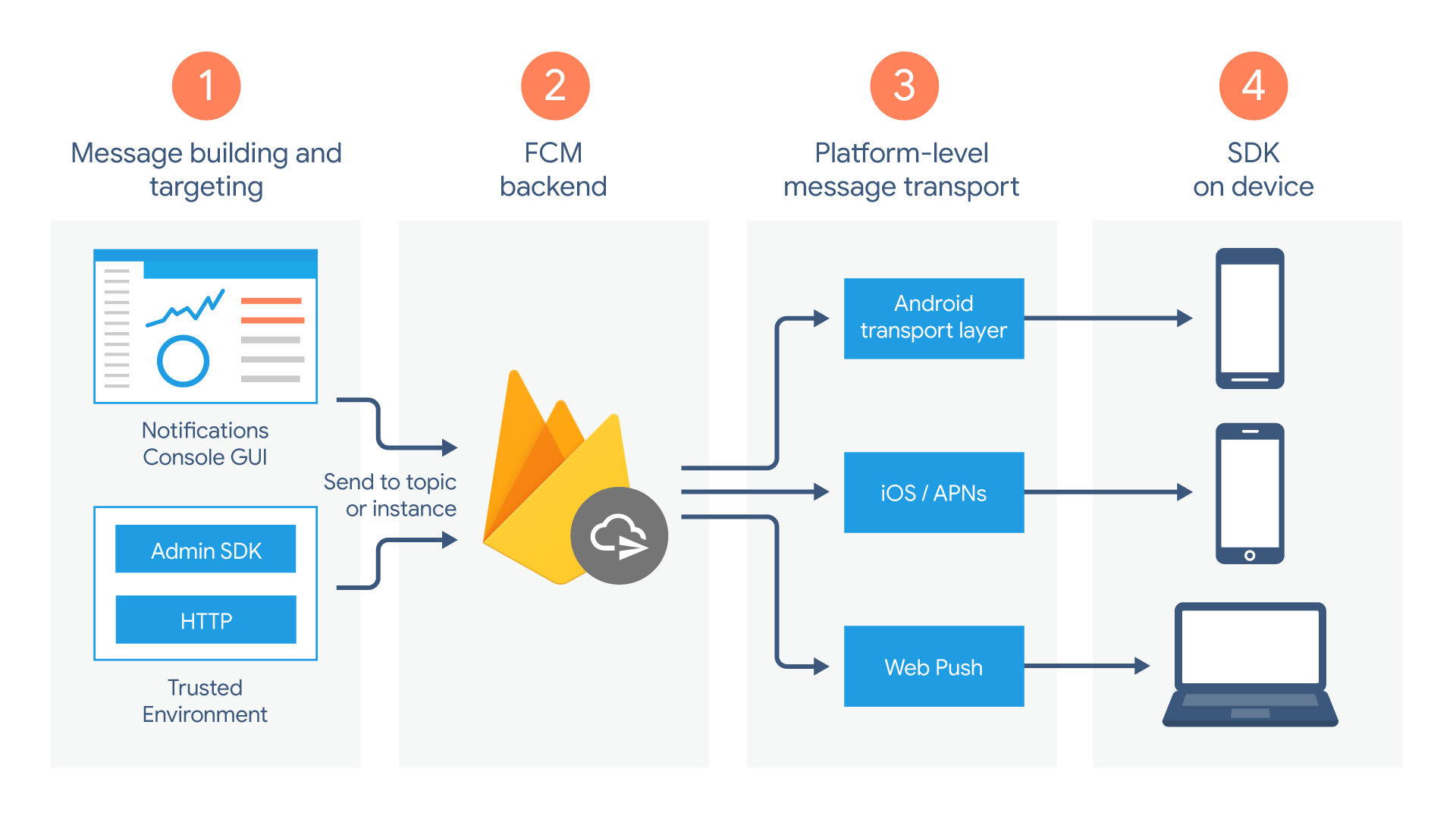
      Firebase Cloud Messaging is a cross-platform messaging solution that allows you to send notifications to your users at no cost. It supports message delivery to devices running Android, iOS, and web apps, enabling a unified approach to push notifications. The key features of FCM include:

      • Targeted Messaging: Send messages to specific devices, user groups, or topics.
      • Reliable Delivery: FCM ensures messages are delivered promptly and reliably.
      • Customizable Notifications: Customize notification appearance, actions, and payloads to suit your app’s needs.

      FCM works by using a unique token assigned to each app instance. When a message is sent from the server, it is directed to the FCM servers, which then route it to the appropriate devices.

      Setting Up Firebase for Angular

      To integrate FCM into an Angular app, you need to set up a Firebase project. This involves creating a new project in the Firebase Console and registering your app. Here are the steps:

      1. Create a Firebase Project: Start by visiting the Firebase Console and creating a new project. Follow the prompts to name your project and set up Firebase services.
      2. Register Your App: Add your Angular web app to the project. You’ll receive a Firebase configuration object containing keys and identifiers required for connecting your app to Firebase.
      3. Add Firebase SDK: Download the Firebase SDK and add it to your Angular project. This includes libraries for Firebase services such as Authentication, Firestore, and Messaging.
      4. Configure Firebase Settings: Copy the Firebase configuration object into your Angular environment configuration file. This step ensures your app can connect to Firebase.

      Installing and Configuring Firebase and AngularFire

      Next, you’ll need to install the Firebase and AngularFire packages:

      npm install firebase @angular/fire

      Once installed, configure Firebase in your Angular app. Import AngularFireModule and AngularFireMessagingModule into your app module and initialize Firebase with the configuration settings.

      import { AngularFireModule } from '@angular/fire';
      import { AngularFireMessagingModule } from '@angular/fire/messaging';
      import { environment } from '../environments/environment';
      
      @NgModule({
        declarations: [AppComponent],
        imports: [
          BrowserModule,
          AngularFireModule.initializeApp(environment.firebase),
          AngularFireMessagingModule
        ],
        providers: [],
        bootstrap: [AppComponent]
      })
      export class AppModule {}

      Implementing FCM Notifications in Angular

      Implementing FCM notifications involves several steps, including requesting user permissions, generating FCM tokens, and handling incoming messages.

      Requesting User Permissions

      Before you can send notifications to a user, you must obtain their permission. In Angular, this can be done using the AngularFireMessaging service. Here’s an example:

      import { AngularFireMessaging } from '@angular/fire/messaging';
      
      constructor(private afMessaging: AngularFireMessaging) {}
      
      requestPermission() {
        this.afMessaging.requestToken.subscribe(
          (token) => { console.log(token); },
          (error) => { console.error(error); }
        );
      }

      Generating and Managing FCM Tokens

      FCM tokens are unique identifiers assigned to each app instance. They are used to target specific devices when sending notifications. You can manage these tokens using AngularFireMessaging:

      this.afMessaging.tokenChanges.subscribe(
        (token) => {
          // Save the token for later use
        },
        (error) => { console.error(error); }
      );

      Handling Incoming Messages in Angular

      To handle incoming messages, subscribe to the messages observable provided by AngularFireMessaging. This allows you to define how your app responds to different types of messages.

      this.afMessaging.messages.subscribe((message) => {
        console.log(message);
      });

      Creating a Notification Service in Angular

      A notification service is a convenient way to manage FCM notifications across your Angular app. It encapsulates the logic for requesting permissions, generating tokens, and handling messages. Here’s a basic implementation:

      import { Injectable } from '@angular/core';
      import { AngularFireMessaging } from '@angular/fire/messaging';
      
      @Injectable({
        providedIn: 'root',
      })
      export class NotificationService {
        constructor(private afMessaging: AngularFireMessaging) {}
      
        requestPermission() {
          return this.afMessaging.requestToken;
        }
      
        receiveMessage() {
          return this.afMessaging.messages;
        }
      }

      This service can then be injected into components to manage notifications more effectively.

      Customizing Push Notifications

      Push notifications can be customized in several ways, including the content, appearance, and actions. The notification payload typically includes a title, body, icon, and data. Here’s an example payload:

      {
        "notification": {
          "title": "New Message",
          "body": "You have a new message!",
          "icon": "/path/to/icon.png"
        },
        "data": {
          "click_action": "FLUTTER_NOTIFICATION_CLICK"
        }
      }

      To customize notifications, you can define specific actions, such as opening a particular page in your app when a notification is clicked.

      Token Management and Subscription Handling

      Managing FCM tokens and subscriptions is crucial for maintaining an effective notification system. Tokens may expire, requiring regular updates and re-subscriptions. Additionally, users may want to opt out of notifications, necessitating an easy way to unsubscribe.

      Testing and Debugging FCM Notifications

      Before deploying your Angular app, thoroughly test FCM notifications. Use the Firebase Console to send test messages and ensure they are delivered correctly. Additionally, check the browser console for errors and handle any issues that arise.

      Deploying Angular App with FCM

      Deploying an Angular app with FCM requires careful preparation. Ensure that all Firebase services are correctly configured and that the app is optimized for production. Use Firebase Hosting for seamless deployment and monitor the performance of notifications using Firebase Analytics.

      Common Challenges and Solutions

      Common challenges with FCM notifications include handling notification permissions, managing multiple environments, and debugging delivery issues. Address these challenges by implementing best practices and leveraging Firebase

      AWS Console: Comprehensive Guide to Managing Cloud Services

      fcm fcm notification firebase firebase notification
      Share. Facebook Twitter Pinterest LinkedIn Tumblr Email
      Previous ArticleaaPanel Free Web Hosting Control Panel Installation on Ubuntu
      Next Article Top WordPress Themes for 2024
      admin
      • Website
      • Facebook
      • Pinterest
      • LinkedIn

      Welcome to Dastgeertech Studio! We are a dynamic and innovative tech company based in Lahore, Pakistan. At Dastgeertech Studio, we are dedicated to providing cutting-edge technology solutions tailored to meet the unique needs of our clients.

      Related Posts

      Blog

      Best Value Flagship Phones 2026: Top Picks & Reviews

      February 28, 2026
      Read More
      Artificial Intelligence

      AI Won’t Replace Web Developers – But THIS Will Change Everything 2026

      November 29, 2025
      Read More
      Blog

      How to Fix a Slow Loading Website: 2025 Guide for Beginners

      November 29, 2025
      Read More
      Add A Comment

      Leave a ReplyCancel reply

      This site uses Akismet to reduce spam. Learn how your comment data is processed.

      Top Posts

      How to Fix CORS Error in .NET Core: A Step-by-Step Guide

      September 16, 2024172 Views

      aaPanel Free Web Hosting Control Panel Installation on Ubuntu

      August 3, 202462 Views

      Google Pixel 8 & 8 Pro: Unveiling the Latest Android Powerhouse

      June 16, 202435 Views
      Latest Reviews
      Most Popular

      How to Fix CORS Error in .NET Core: A Step-by-Step Guide

      September 16, 2024172 Views

      aaPanel Free Web Hosting Control Panel Installation on Ubuntu

      August 3, 202462 Views

      Google Pixel 8 & 8 Pro: Unveiling the Latest Android Powerhouse

      June 16, 202435 Views
      Our Picks

      Best Programming Languages 2026: Developer Guide and Trends: The Complete Breakdown Nobody Asked For

      April 13, 2026

      Samsung Galaxy S26 Ultra Review: The New Android King: The Complete Breakdown Nobody Asked For

      April 11, 2026

      I Tested GPT-5 Released: Complete Review and Benchmark Results for 30 Days: Here is the Truth

      April 11, 2026
      © 2016 Dastgeertech Studio. All rights reserved.
      • Dastgeertech Studio
      • Technology
      • Privacy Policy
      • About Us
      • Blog

      Type above and press Enter to search. Press Esc to cancel.

      Ad Blocker Enabled!
      Ad Blocker Enabled!
      Our website is made possible by displaying online advertisements to our visitors. Please support us by disabling your Ad Blocker.

      Sign In or Register

      Welcome Back!

      Login below or Register Now.

      Lost password?

      Register Now!

      Already registered? Login.

      A password will be e-mailed to you.